
This release brought individual fulfillment assignment, the option to show sponsor names on sold opportunities, more ways to showcase your event on your event landing page, and a handful of smaller improvements and bug fixes. Have a question about anything below? Reach out to support@claritymediapartners.com.
New: Assign Fulfillment Deliverables to Individual Team Members
Fulfillment deliverables can now be assigned to a specific person, not just a company. Organizers and sponsors can both assign a team member on top of the existing company assignment, so the right person on your team (or the sponsor's) is accountable for each deliverable.
How to use it: Open a deliverable's details page and use the new Team Member field alongside Company. The team member dropdown shows everyone on your account team plus the sponsor's event team; anyone newly assigned is automatically added to the event team if they weren't already on it. On the organizer fulfillment table, use the new assignee quick filter to see just your items. On the sponsor fulfillment table, the "Assigned To" column now shows the team member instead of the company. Email notifications only go to the assigned team member, not the whole company, unless a deliverable is assigned to all members.
-1.png?width=670&height=573&name=Release%20Note%20-%20Team%20Assignment-selection%20(2)-1.png)
New: Show Sponsor Names on Sold Opportunities
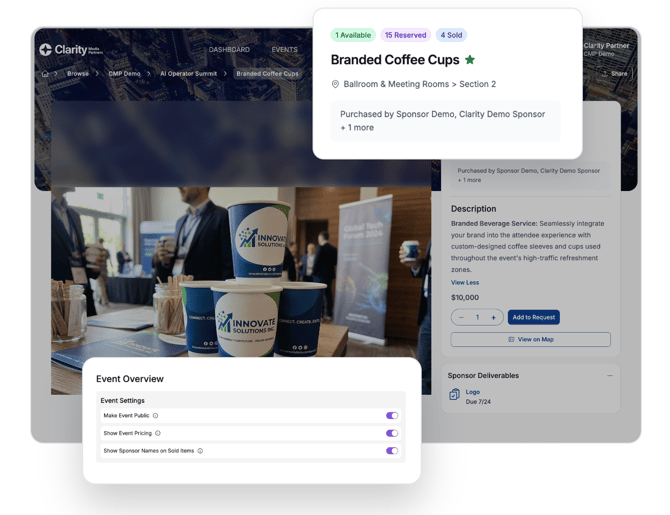
Organizers can now choose to automatically display the names of sponsors who've purchased an opportunity, right on their event and opportunity pages, a nice way to show momentum and give other sponsors social proof.
How to use it: Turn this on at the event level in your event settings. Once enabled, sold opportunities show a "purchased by" section, and hovering over availability badges on opportunity tables surfaces which sponsors have reserved or purchased that item.
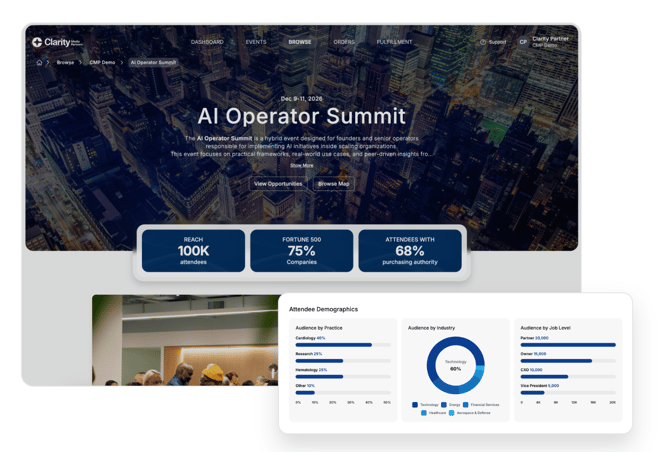
New: Feature Event Stats and Attendee Demographics on Your Event Landing Page
Your event landing page now does more of the selling for you. Feature event stats right up front, and attendee demographic breakdowns moved from behind a tab onto the main page, so sponsors see your audience data as soon as they land. Events with a location-enabled map also get a more prominent "browse by floor map" card so sponsors can shop opportunities visually.
How to use it: Create or select Event Stats that you'd like to display with the Event Details tab of your event, and create attendee demographic breakdowns on the Attendee Demographics tab. Events with a location-enabled map automatically show a "browse by floor map" card, so sponsors can shop opportunities visually.
Also in this release
- Clearer quote send modal: Sending a quote or proposal now shows recipients as a multi-select field pre-populated from your CRM contacts, labeled "Recipients from My Contacts." Remove any contact you don't want included, or add a new recipient by name and email, which also creates a contact for them in your CRM. Applies to the initial send, resend, and the Fulfillment Only "Begin Fulfillment" email modal.
- Bulk opportunity actions: Update "Visible on Event Landing Page," "Available for Sale," inventory quantity, hide pricing, and "Featured" status across multiple opportunities at once, instead of editing one at a time.
- Rearranged opportunity images: Reorder an opportunity's images directly from the opportunity settings page.
- Custom audience breakdowns: Build your own audience breakdown categories and metrics, choose between percentage and count, add a chart title, and preview your chart before publishing it.
- Improved deliverable and requirement setup: A cleaner UI for defining fulfillment deliverables and requirements from the Opportunity Settings page.
- Proposal UI refresh: Proposal stats now match the updated event stat styling, opportunity cards are grouped by event (soonest event first) and narrower, and each card has a "View Details" button.
- Fixed an issue where the "browse map" button showed on an event landing page even when there were no opportunities with a location set.
- Fixed an issue where opportunity availability decreased as soon as a sponsor added an item to their cart, instead of once it was placed into a quote.
- Fixed a mislabeled modal title that showed "Change Status" instead of "Change Assignee" when reassigning a deliverable from the fulfillment table.
- Fixed an outdated navigation style on the opportunity details page within proposals.