
This release brought a redesigned sponsor experience, a more organized way to manage fulfillment, and a handful of smaller improvements and bug fixes. Have a question about anything below? Reach out to support@claritymediapartners.com.
New: Redesigned Sponsor Experience
Sponsors now get an updated experience designed to centralize their activity in a single portal - no more juggling 15 logins. Orders, quotes, and fulfillment deliverables roll up in one place across every event a sponsor is part of, and browsing opportunities is a lot more streamlined. The redesign also includes an optimized mobile experience and a rebuilt mobile navigation.
If you'd like to help your sponsors get oriented, pass along the Sponsor Quick Reference Guide!
New: Internal Fulfillment Deliverables
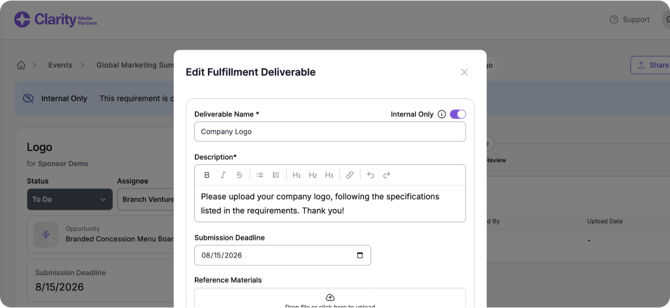
You can now mark a fulfillment requirement as internal only, so your team can track it without the requirement being visible to, assigned to, or triggering notifications for the sponsor. Internal-only requirements are excluded from sponsor-facing fulfillment kickoff and deadline reminder emails, and from every sponsor-facing view, but still show up on your organizer-facing fulfillment tables and emails with a visual indicator.
How it works: Toggle "Internal Only" when creating or editing a fulfillment requirement / deliverable. Once marked internal, the deliverable auto-assigns to your team instead of the sponsor and shows a banner on its details page. Use the new Internal/External filter on the fulfillment list view to see just one type.
New: Your Clarity Storefront
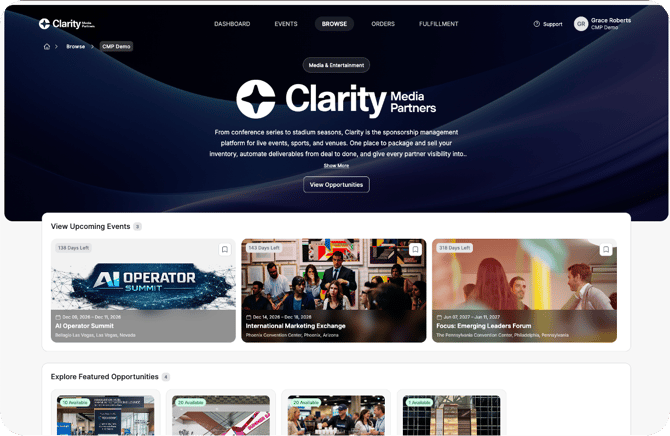
Sponsors can now browse everything an organizer offers, across every event and opportunity, from a single landing page for that organization, instead of finding the organizer event by event.
How to use it: Go to the Company tab in Manage Account to customize your landing page's branding (images, description, contact info, and more). Sponsors can reach your page via their "Browse" page in the platform, or by using the breadcrumbs when they are on one of your event pages.
Tip: Marking event opportunities as "featured" will bubble them up to the "Explore Featured Opportunities" section on your storefront. Same for featured categories!
New: Mark Invoices as Paid
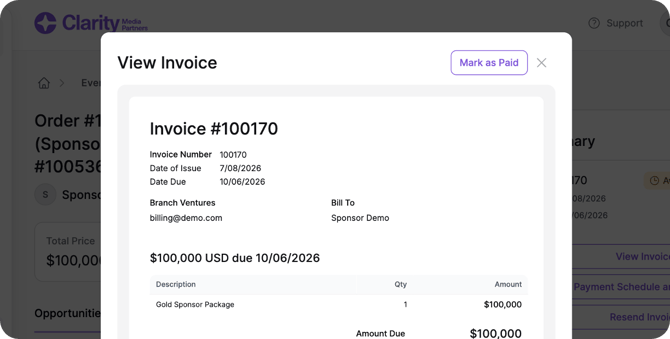
You can now mark an invoice as paid directly in Clarity. Useful for payments collected outside the platform (check, wire, and so on), so your records stay accurate without forcing a payment through online checkout.
How to use it: From the order details page, click "View Invoice" on the invoice card, then click "Mark as Paid."
Also in this release
- Refreshed nav bar: A cleaner look for the main organizer navigation. Everything's in the same place, just consolidated and collapsible.
- Customizable comment sort order: Comments on a deliverable details page now have a dropdown to switch between "Newest first" (still the default) and "Oldest first," so long comment threads are easier to follow.
- Sponsor name on deliverable and order item details: You'll now see the sponsor's name directly on the deliverable details page and the order item details page, along with clearer labels on the status and assignee dropdowns.
- Standardized event logos: Event logos now display consistently at a 16:9 ratio throughout the app.
Bug Fixes
- Fixed an issue where property details couldn't be edited after creating a new property.
- Fixed an incorrect "unavailable" warning that showed for bundled items when adding a package to a quote.
- Fixed an issue where canceled order items couldn't be unpublished or deleted.
- Fixed a reporting issue where the customer company name dimension was breaking Insights reports.
- Fixed long company names wrapping to three lines in the top navigation.