
New: Event Details and Marketing Page Tabs ✨
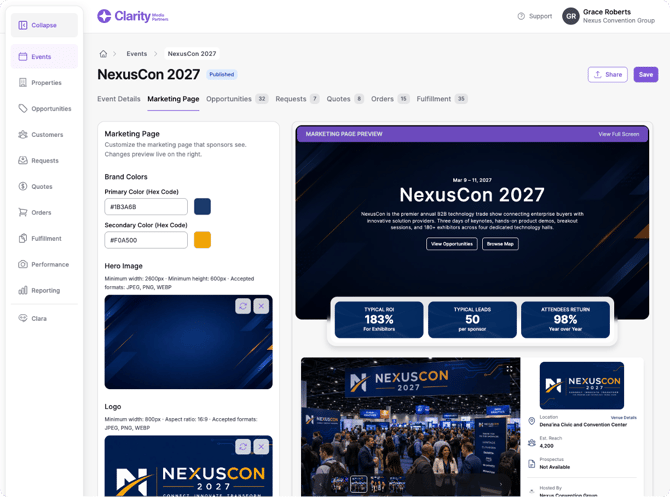
Within an Event, event setup is now split into two tabs - Event Details and Marketing Page - which provides Organizers an enhanced side-by-side editing experience for their event landing pages.
How to use it:
- Event Details tab: Attendee Demographics and Event (Sales) Goals are now part of this tab. A sub-nav on the left scrolls you to the related form section.
- Marketing Page tab: A new tab next to Event Details with a side-by-side editor covering the hero image, event stats (select or create), gallery images, prospectus PDF, attendee breakdowns (select or create), and category and opportunity sorting.
Also in this release
- Package map locations: Packages can optionally have their own location and show as a single pin on the floor plan. Packages without a location behave as before. Child items show on the map by default, and an item marked as not visible on the event landing page is also hidden from the map. (All plans)
- Catalog column on the Organizer Landing Page: The All Opportunities table now includes a Catalog column between Item and Category. (Full Platform, Showcase, Showcase + Fulfillment)
- New invoice fields: Invoices now include the organizer address, the sponsor address, and tax percentage per item. Tax percentage only shows if the tax feature is on, and is hidden if the organizer hides the price breakdown. (Full Platform)
- Catalog names on invoices and contracts: Organizers can show the catalog name next to opportunity names, useful when the same item is sold across multiple events. (Full Platform)
Bug fixes
- Fixed an issue where the "Browse by Category" card icons were misaligned on the company page.
- Fixed an issue where users with fulfillment or view-only roles could not see the Reporting section. All users can now see reporting regardless of role.
- Fixed an issue where an order's name was cleared when the order was adjusted.
Questions about anything above? Reach out to support@claritymediapartners.com.